
Messaging apps carry much more than casual chat. People send family photos, work files, addresses, travel plans, payment details, and personal messages through them every day. Keeping those messages private depends on the app you use, how your account is protected, and what you choose to share. Your login settings, phone security, connected devices, and the information you share all affect how private a chat stays.
1. Use an Encrypted Messaging App
Choose a messaging app that uses end-to-end encryption for private chats and calls. With end-to-end encryption, messages are encrypted before they leave your device and can only be decrypted on the recipient’s device. This keeps the content unreadable while it travels between the sender and recipient.
imo uses end-to-end encryption for messages and calls, so their content is protected while being transmitted.
2. Add Another Layer with Two-Step Verification
Many messaging apps use a phone number and verification code when someone signs in on a new device. That becomes a problem if another person manages to get the code.
Two-step verification adds another credential, such as a PIN, before a new login can be completed. Even if someone gets the SMS verification code, they still need the second credential.
Use a PIN that is different from passwords or codes you already use elsewhere. Do not share verification codes or your two-step verification PIN with anyone. If someone asks you to send them a login code so they can “verify” or “fix” your account, do not send it.
3. Lock the App, Not Just the Phone
If other people sometimes use your phone, an app lock can keep your messages private even when the device itself is already unlocked.
Most app locks use a PIN, fingerprint, or face recognition. This is especially useful on shared devices, or when you often hand your phone to friends, family members, or coworkers.
4. Use Disappearing Messages When Chats Do Not Need to Stay
Disappearing messages are useful for conversations that only matter for a short time, such as travel plans, temporary addresses, meeting details, or personal notes. Instead of leaving everything in your chat history, you can set messages to disappear automatically after a chosen period. They are also a simple way to keep old chats from piling up with information you no longer need.
5. Reduce Screenshots and Saved Copies
Screenshots make it easy for a private chat to be saved and shared outside the chat. If your messaging app offers screenshot protection, turn it on for conversations where you do not want messages copied casually. Some apps also let you block screenshots during voice or video calls, which can help prevent direct screen captures.
Screenshot protection cannot stop every form of copying. Someone may still use another device, a camera, or third-party tools to record a video call or capture what appears on the screen.
6. Check Your Profile Privacy
Your profile can reveal more than your messages do. Review who can see your phone number, profile photo, Stories, online status, and other account information.
A profile photo, phone number, recent Story, and online status may not feel especially sensitive on their own, but together they can reveal more than you expect. Keeping some details visible only to contacts can reduce unwanted messages and make your profile less useful to strangers trying to learn more about you.
For imo, see imo Profile Privacy Settings.
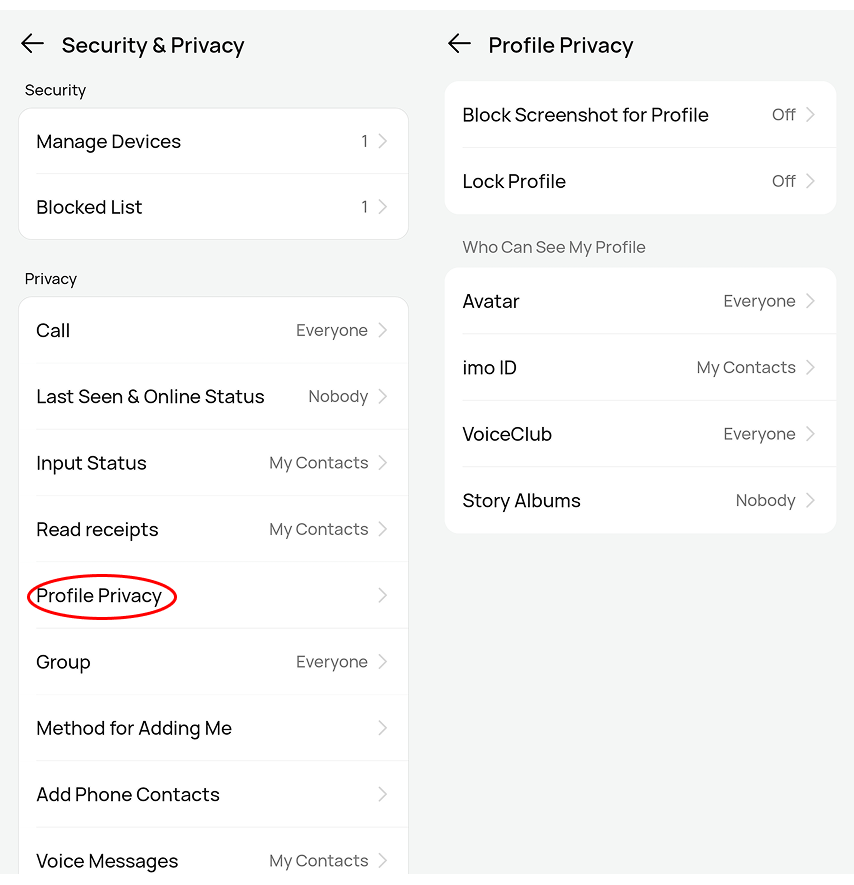
7. Be Careful with Links and Files
A private messaging app can still be used to send phishing links or harmful files. Be cautious when a message asks you to open a link, download a file, send money, or provide a login code. Urgency is a common warning sign, especially when someone claims your account will be closed, a payment has failed, or a package cannot be delivered unless you act immediately. PDF, ZIP, APK, and other file types can be legitimate, but an unexpected file from an unknown sender should not be opened just because it arrived inside a familiar messaging app.
If a friend suddenly sends something unusual, ask them about it before opening the link or file. Their account may have been compromised. For apps installed outside an app store, use the official website rather than downloading installation files from random pages.
8. Keep Your Messaging App Updated
Messaging apps and operating systems are updated partly to fix security problems discovered after earlier versions were released.Using an old version for a long time can leave known issues unpatched. Keep your messaging app, Android or iOS version, and desktop operating system reasonably up to date.
Avoid unofficial modified versions of messaging apps. They may remove security controls, change how data is handled, or include code you did not expect.
9. Check Your Logged-In Devices
Messaging accounts often stay signed in on old phones, computers, or web browsers long after you stop using them.
Check your connected devices regularly and remove any you no longer use. This is especially worth doing after changing phones, using a shared computer, or losing a device.
10. Share Only What You Need To
Not every detail needs to be sent through a chat. Verification codes, passwords, full card details, and identity documents are better left out of everyday messages. For everything else, sharing only what the other person actually needs means less personal information stays in your chat history long after the conversation ends.