Your imo profile may include personal details like your profile photo, imo ID, stories, and activity. To help protect your privacy, imo provides settings that let you control who can see your profile information and activity.
This guide will show you how to manage imo profile privacy settings and protect your profile visibility.
Key Profile Privacy Features on imo
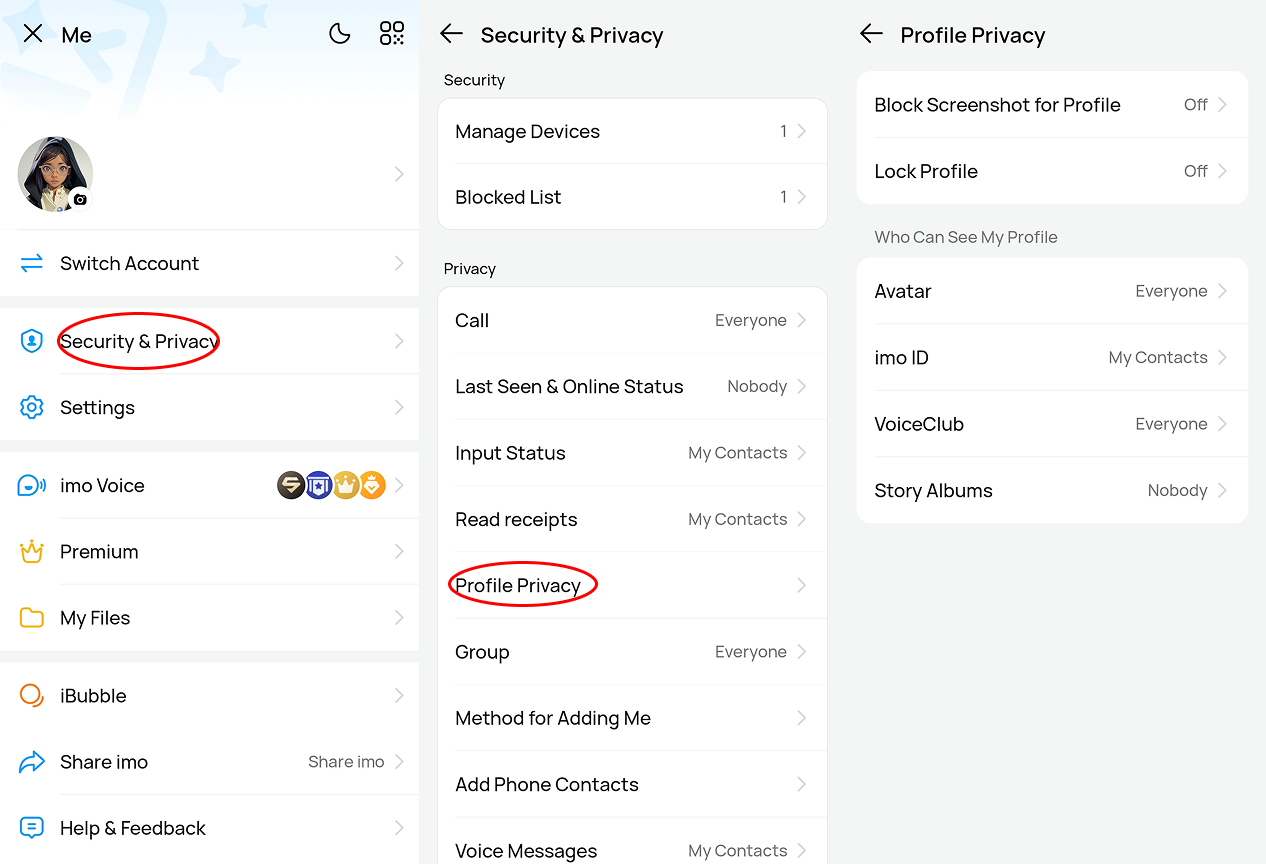
- Block Screenshot for Profile: Turning this on prevents others from taking screenshots or screen recordings of your profile page. This is a powerful way to stop strangers from stealing your avatar or cloning your identity.
- Lock Profile: This feature locks your profile so that users who are not in your contacts cannot view your full profile information.
- Profile Visibility Controls: imo allows you to choose who can see different parts of your profile. You can set visibility for:
* Profile photo (Avatar)
* imo ID
* Stories Albums
* VoiceClub activity
Each option can be set to:
* Everyone
* My Contacts
* Custom
* Nobody
This gives you full control over who can access your profile information.
How to Adjust Your Profile Privacy Settings
Adjusting your imo privacy settings only takes a few steps:
- Open imo and go to Me
- Tap Security & Privacy
- Select Profile Privacy
- Choose the feature you want to change, such as your Avatar, imo ID, or Story
- Select your preferred visibility option
Once saved, your profile visibility will update immediately. By taking less than a minute to adjust these settings, you can enjoy chatting on imo while keeping your personal data fully secure!