Bright chat screens can feel uncomfortable at night, especially during long conversations in dark rooms or before sleep. That is one reason dark mode has become common across messaging apps. imo includes a built-in dark mode that provides a black background for night chats, instantly transforming the app interface into a darker, eye-friendly theme.
Why Messaging Apps With Black Background Became Popular
The phrase “messaging apps with black background” does not always refer to a completely black screen. Many apps use dark gray, charcoal, or deep blue because pure black can create harsh contrast with white text, especially when screen brightness is high. Softer dark shades are often more comfortable during long conversations.
Dark mode also suits the way people use messaging apps. Chats often continue late at night, users check messages in bed, and video calls may happen in dim rooms. In these situations, a bright white interface can feel distracting, while a darker background blends more naturally with the surroundings.
Dark interfaces can also make a messaging app look cleaner. When chat lists, menus, and message panels use similar tones, the screen feels less divided and easier to scan.
Dark mode may also reduce power use on phones with OLED or AMOLED displays. These screens can switch off individual pixels when showing black or very dark areas, which can help extend battery life.
How to Enable imo Dark Mode
Switching your imo to Dark Mode is quick and easy, whether you are using your phone or chatting on your computer.
On Mobile (Android & iOS):
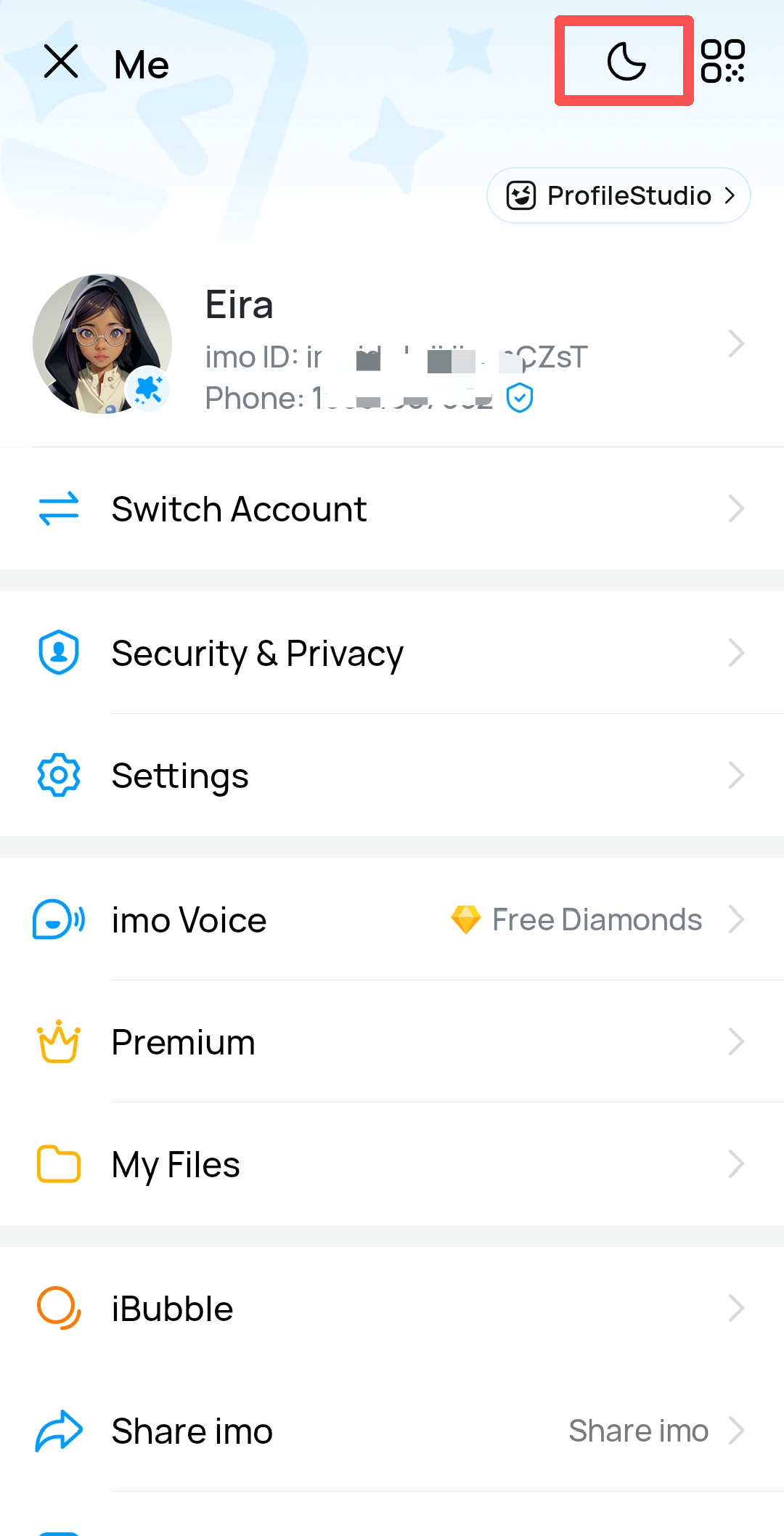
- Open the imo app and tap your Profile Picture in the top left corner.
- Look for the Moon Icon next to your profile information.
- Tap the moon icon to instantly toggle Dark Mode on or off.
On the Web Version (web.imo.im):
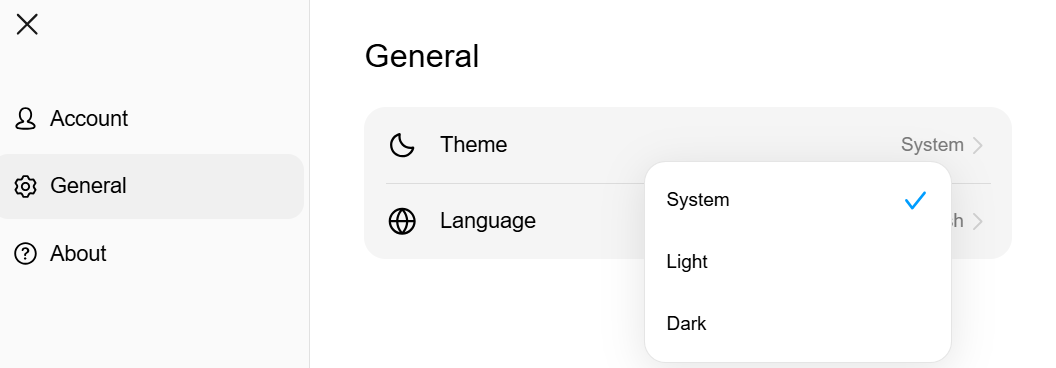
- Click on the Settings gear icon.
- Go to the General tab.
- Look for the Theme section and select Dark to apply the new background.
imo Private Chats Also Use a Darker Interface
When you enter a Private Chat on imo, the interface automatically switches to a darker layout, making it visually different from regular conversations. Private Chats also include end-to-end encryption and screenshot protection features for more secure communication.
The darker interface is especially useful at night, since it feels less distracting in low-light environments while also giving users a clearer visual cue that they are inside a protected conversation.
More read: https://imo.im/blog/guides/can-end-to-end-encryption-be-hacked
How to Get the Best Night Chat Experience on imo
Talking to friends and family late at night should be comfortable for your eyes. Here are four simple ways to set up your imo app for the perfect late-night experience:
- Turn on Dark Mode: Go to your profile settings and switch to Dark Mode. This instantly changes the bright screen to a clean, dark layout, making it much easier to read messages in a dark room.
- Pick a True Black Background: You can change your chat background to absolute black in the settings. If your phone has an OLED or AMOLED screen, a pure black background completely turns off those screen pixels. This can make the screen feel less harsh in dark environments while also helping reduce battery usage.
- Use Private Chats: Start a Private Chat when you want to discuss personal topics. The chat screen automatically turns into a deep dark color. This tells you that your chat is fully secure with end-to-end encryption.
- Adjust Lighting for Night Video Calls: If you are making a video call in the dark, avoid having a bright light directly behind you, as this turns you into a dark shadow. Instead, place a soft, dim light in front of you or slightly to the side to light up your face without hurting your eyes.
For many people, dark mode simply feels more comfortable at night. Whether you are chatting before sleep, checking messages in a dark room, or making late-night video calls, a darker interface can feel much easier on the eyes. imo allows users to switch themes quickly while also offering darker private chat interfaces for more secure conversations.
FAQs About imo Dark Mode
Q1. Does dark mode affect the functionality of the imo app?
No, Dark mode in the imo app does not affect the functionality of the app in any significant way.
Q2. Is imo dark mode suitable for all types of screens?
Dark mode is a user interface design that has gained popularity across various types of screens, including phones, tablets, and computers.
Q3. Will "imo dark mode" change the display of pictures and videos?
No. Turning on imo Dark Mode does not change the pictures or videos themselves. However, they may appear slightly different because they are displayed against a darker background.
https://imo.im/en/faq/Will-imo-dark-mode-change-the-display-of-pictures-and-videos