Unknown calls can make a chat app feel less private than it should. The caller may be someone outside your contact list, a person from a shared group, or a spam account you do not want to hear from again. Instead of waiting for unwanted calls to keep happening, it makes more sense to control who can call you first and block unknown callers when needed.
How to Control Who Can Call You
On imo, you can control who is allowed to call you from your call privacy settings.
- Open the app and tap Me.
- Tap Security & Privacy.
- Select Call.
- Choose Everyone, My Contacts, or Nobody.
- If needed, use Never Allow to stop specific people from calling you.
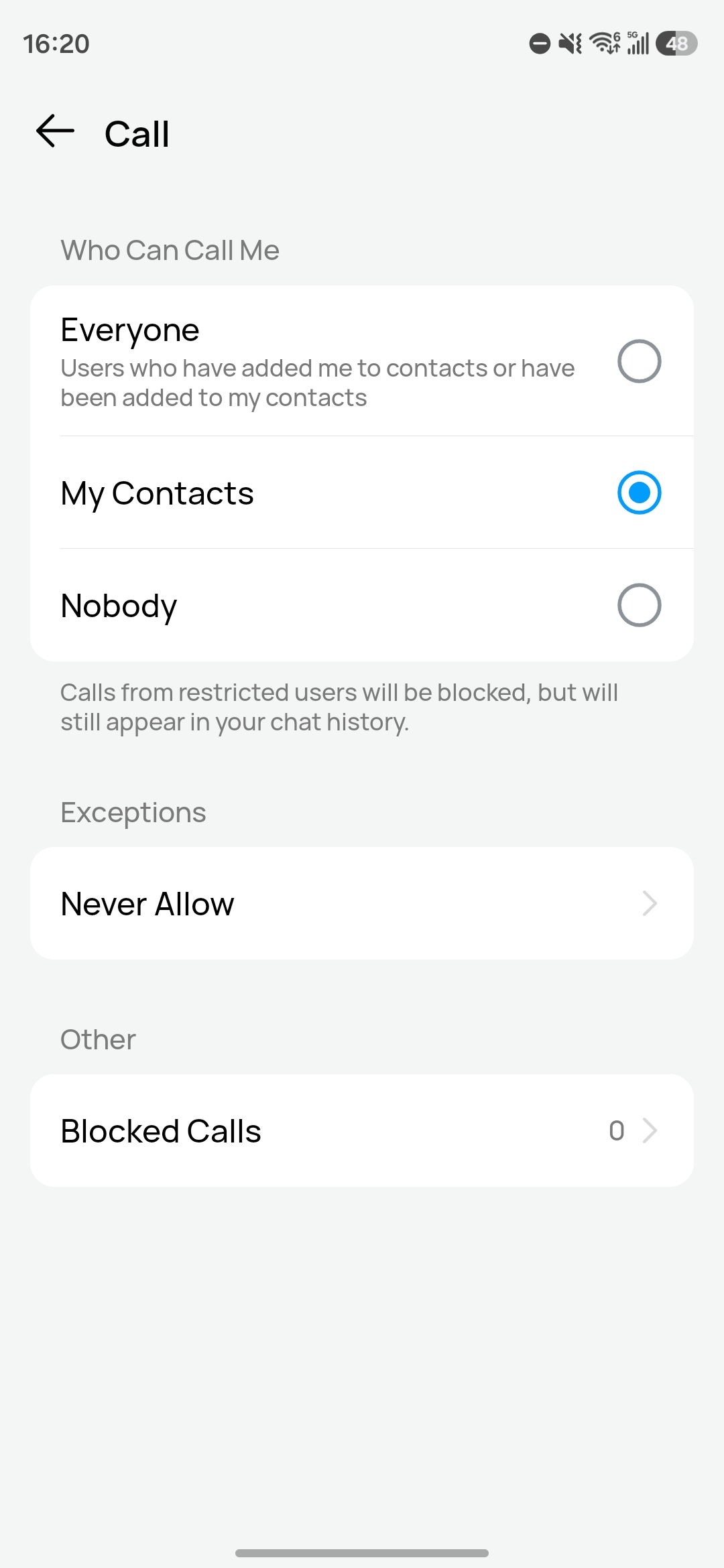
For most people, My Contacts is the most practical setting. It lets people you know reach you more easily while reducing calls from strangers. If you want stricter control, switching to Nobody gives you more privacy.
Calls from restricted users will be blocked, but they can still appear in your chat history. You will not be interrupted by the call, and you can still check the record later.
When to Block Unknown Callers
If the same unknown account keeps calling, or if the contact feels suspicious, pushy, or clearly unwanted, general call settings may not be enough. It also makes sense to block someone after a shared-group contact turns into repeated calling. Not every unknown call is malicious, but repeated attempts from a person you do not know usually mean the caller has already crossed a line.
Extra Ways to Reduce Unwanted Calls
Call settings matter most, but unwanted calls often happen because too many people can find your account. These privacy checks can reduce that risk.
- Tighten profile visibility. If strangers can easily see your profile photo, status, or other account details, they have more context to identify or contact you. Limit what non-contacts can view.
- Clean up shared groups. Large groups, old groups, and semi-public groups make it easier for people you do not know to find your account and start calling. Leave the ones you no longer need.
- Be careful where your number appears. If your phone number is posted in open communities, business comment threads, or public contact lists, unknown calls become much more likely.
- Review privacy settings as a set, not one by one. Call permissions, profile visibility, and contact-related settings work together. If one part stays too open, unwanted callers may still be able to reach you.
If calls from strangers keep happening, do not rely on blocking alone. Reduce how visible your account is, limit who can call you, and then block repeat callers individually. That combination works much better than fixing the problem one call at a time.