फोन नम्बर परिवर्तन गर्नुहोस्
Please upgrade imo to the latest version with better security and privacy.
Before you stop using the old phone number, please log in imo with your old phone number and change to the new phone number by following the instructions below:
Enter [Me] page
- Settings
- Accounts & Security
- Change Phone Number
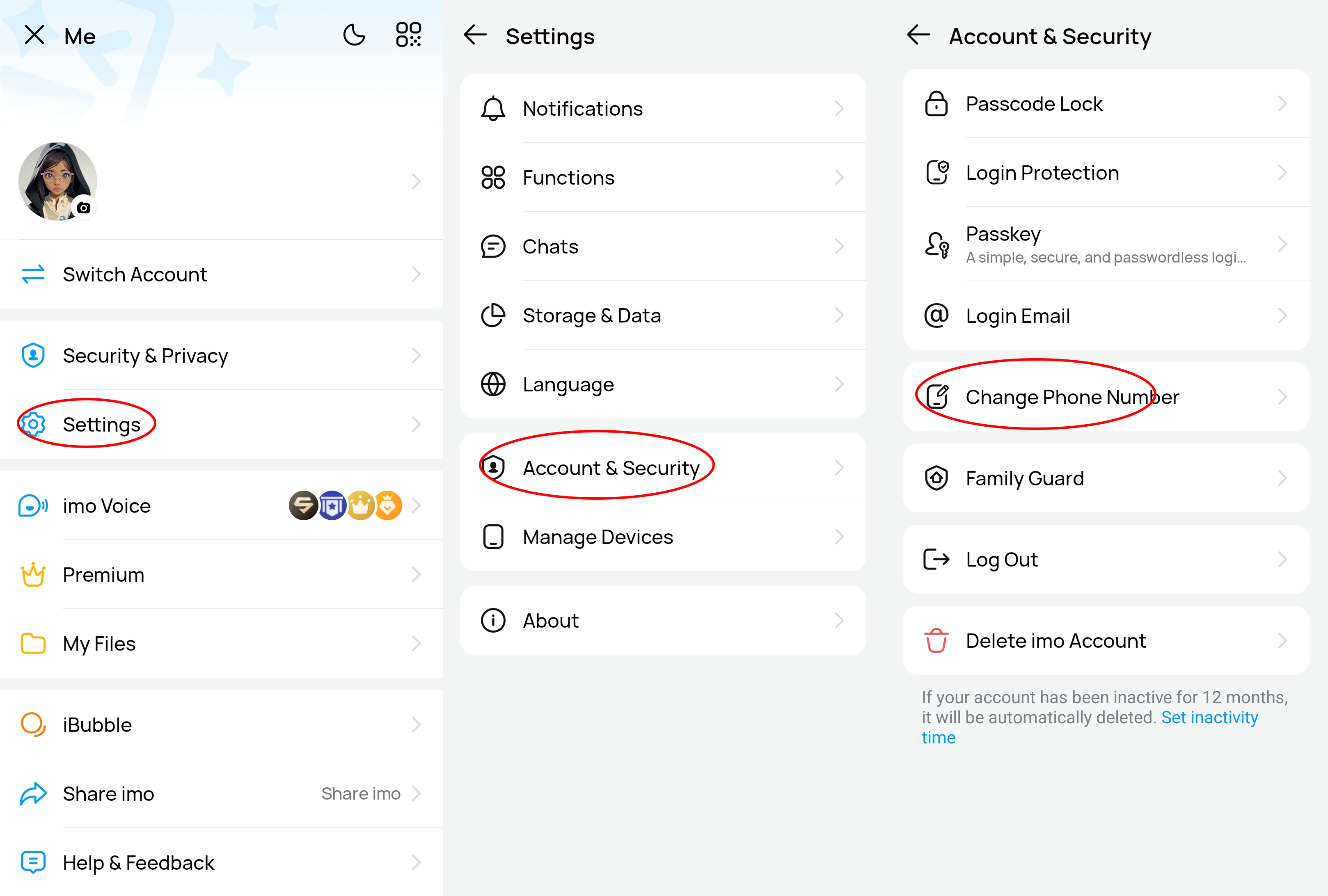
Then input your old and new phone number and verify it with a verification code. After verifying, phone number will be changed successfully.
Note:
1. Avoid symbol, space or extra '0' between country code and phone number.
2. Changing number in imo will remove the data of the new inactive number. If the new number is active recently, system will prompt you to delete the new number before changing number.
3. If you want to log out from your current account, please choose "log out" in [Accounts & Security].
4. If we detected an unusual login attempt to your account that seemed suspicious, to secure your account, "Change Phone Number"will be suspended for 7 days.
5. If you can't log in with old phone number, it's not able to change phone number in this way. You are suggested to register a new account.