के म मेरो imo Story कसले हेर्ने भनेर छान्न सक्छु?
Yes, you can set the privacy settings for your imo Story to control who can see your content. Here's how you can do it in detail:
1. Open the imo app and go to the "Story" section.
2. Select the Story you want to post, then tap Next. On the editing page, you can choose who can view your Story in the bottom-left corner.
3. Click you should see a list of privacy options such as "Everyone," "My Contacts Only," "Visible to Selected Contacts," and "Hide from Selected Contacts."
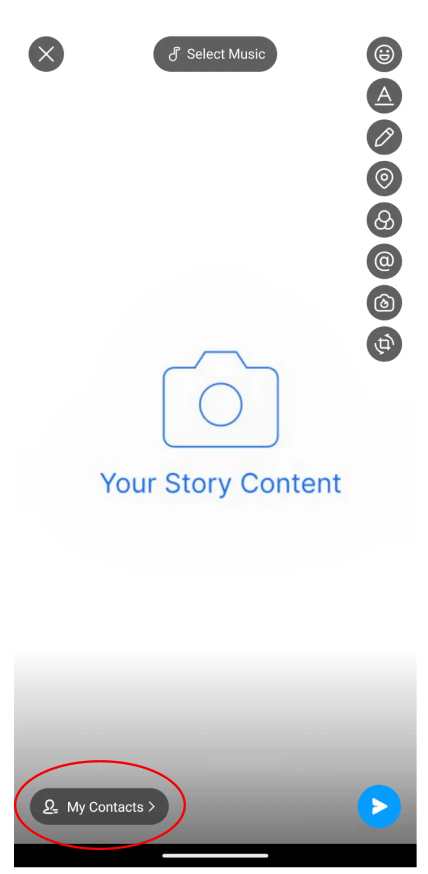
4. Choose the privacy setting that best suits your preferences. For example, if you want only your contacts to see your story, select "My Contacts Only" If you want to customize the visibility further, you can choose "Visible to Selected Contacts" or "Hide from Selected Contacts" and then select the specific contacts you want to include or exclude.
5. Once you've selected your preferred privacy setting, save the changes, and your imo Story will now be visible according to the privacy settings you've chosen.
By following these steps, you can easily control who can see your imo Story content and ensure that it's shared only with the audience you want.