Chat histories often contain details that stop being useful after a few days or weeks, such as travel plans, meeting locations, temporary addresses, and everyday personal messages.Disappearing messages let you set a time limit for new messages in a chat. Once the timer expires, those messages are removed automatically from the chat.
How Disappearing Messages Work
Disappearing messages stay in the chat until the selected timer expires. The available timers depend on the messaging app and may range from hours to days or longer.
They are different from View Once photos or videos. View Once content can usually be opened only once, while a disappearing message stays in the chat until its timer expires. In many apps, turning the feature on does not remove messages that were already in the conversation. It applies to messages sent after the setting is enabled.
When Disappearing Messages Are Useful
Some messages are only useful for a short period of time. You might share a hotel address during a trip, send a meeting location for later that day, or discuss plans for an event happening that weekend. Once those plans are over, there is usually little reason for the details to remain in the chat for months.
This also works well in busy group chats. A group organizing a trip, class, event, or short-term project may exchange dozens of messages that are no longer needed once the activity ends. Choose a timer based on how long the message needs to stay available. A very short timer may not work well if someone is offline or cannot check the chat immediately. Information that you expect to return to later, such as important documents, receipts, or long-term contact details, is better kept outside a disappearing conversation.
What Disappearing Messages Cannot Prevent
A message disappearing from a chat does not mean nobody can save it. Before the timer expires, someone may still be able to take a screenshot, copy the text, forward the information, photograph the screen with another device, or otherwise record what they see.
imo offers screenshot protection alongside disappearing messages. Screenshot protection can block direct screenshots, although someone could still use another device to capture the screen.
Disappearing Messages on imo
imo supports disappearing messages for private chats. After the feature is enabled, you can choose how long new messages remain available before they disappear automatically.
To turn on disappearing messages:
- Open the chat where you want to use the feature.
- Open the chat settings.
- Select and enable Private Chat.
- Choose a disappearing message duration: 1 day, 7 days, or 30 days.
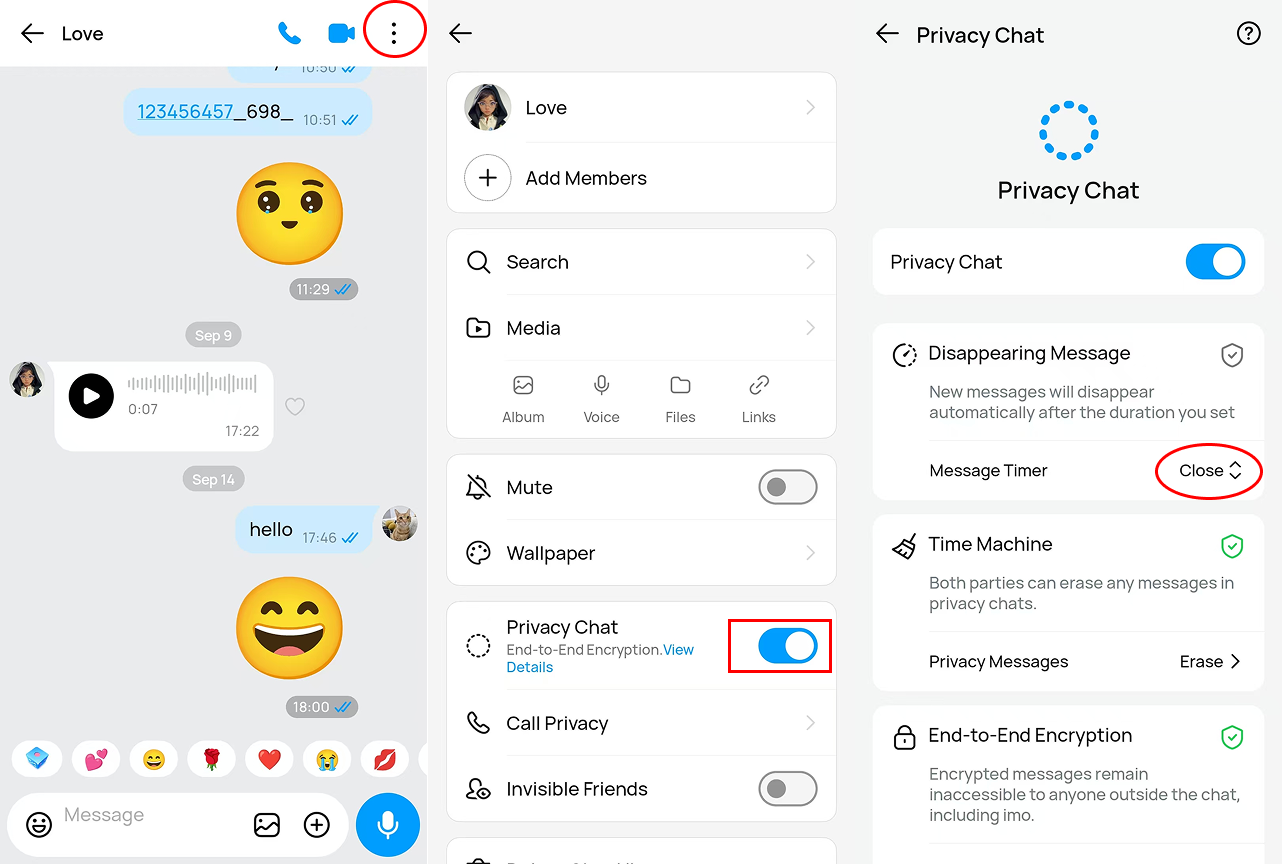
Once enabled, new messages in that chat will follow the selected duration. imo also offers screenshot protection, which can be used alongside disappearing messages for chats where you want more control over how messages are kept or captured.
For more on disappearing messages, visit our Help Center: About imo Disappearing Messages.