Many people have experienced calls that sound unclear, lag behind, or suddenly drop. These problems can happen during traditional phone calls or internet-based calls. Call quality issues are usually not caused by a single factor.
In most cases, they come from a mix of network conditions, device limitations, and the calling app's handling of unstable connections. Understanding these reasons makes it easier to know what can be fixed and what cannot.
What Call Quality Means
Call quality is not just about how clear a voice sounds. It is a mix of clarity, timing, and stability.
A good call has three basic traits. Audio arrives quickly, voices sound natural enough to understand without effort, and the connection stays active throughout the conversation. When one of these breaks down, users notice immediately.
Poor call quality often appears as delayed responses, broken or robotic audio, sudden silence, or dropped calls. These issues may come and go during a single call, which makes them even harder to tolerate. A conversation that keeps interrupting itself becomes tiring, even if each interruption is brief.
7 Common Causes of Poor Call Quality
Call quality problems are often blamed on "bad internet," but that explanation is too vague. Several specific issues usually sit behind the problem.
1. Weak or unstable internet connections
A weak network is not always a slow one. Many networks fail because they are unstable. Signal strength changes from moment to moment as users move, switch cells, or share bandwidth with others.
When the connection keeps changing, voice packets do not arrive at a steady pace. Some arrive late, some arrive early, and some never arrive at all. The calling system has very little time to react. Small interruptions quickly turn into audible problems.
This is why calls often struggle in places where browsing or messaging still works. Text can wait. Voice cannot.
2. Limited bandwidth
Bandwidth is the amount of data your network can handle at once. When bandwidth is low, voice packets must compete with everything else using the network.
Video streaming, app updates, and cloud syncing can all reduce the space available for voice data. Even short spikes in background traffic can disrupt a call. The result is often broken audio or sudden drops in quality.
Many users assume that if their internet connection is "on," it should be enough. In practice, voice calls need consistent bandwidth more than high peak speed.
3. High latency
Latency measures how long it takes for data to travel between two points. High latency does not always reduce audio clarity, but it changes how conversations feel.
When latency increases, responses arrive late. People talk over each other or pause awkwardly, waiting for replies. Even delays that seem small on paper can disrupt the natural rhythm of speech.
In voice communication, delayed data is often worse than lost data. If audio arrives too late, playing it only adds confusion. Most systems choose to drop late packets rather than slow down the conversation further.
4. Packet Loss and Missing Audio
Voice data is sent in small packets. If some of these packets do not arrive, parts of the audio are missing. This is known as packet loss.
Packet loss often happens on crowded networks or unstable connections. When it occurs, voices may sound choppy or incomplete. In severe cases, entire sentences disappear.
5. Jitter and Uneven Packet Delivery
Even when packets arrive, they may not arrive evenly. This problem is known as jitter.
To deal with jitter, calling apps use a small buffer. The buffer holds audio briefly before playback, allowing the system to smooth out timing differences. If network conditions change too quickly, the buffer cannot fully compensate.
When the buffer is too small, audio breaks up. When it grows too large, delays increase. Managing this balance is one of the hardest parts of real-time voice communication.
6. Network congestion
During busy hours, many people share the same network resources. This is common in apartment buildings, offices, and public Wi-Fi spots.
When networks are congested, calls compete with other traffic. This increases latency, packet loss, and jitter, all at the same time.
7. Device and hardware issues
Sometimes the problem has little to do with the network. Old devices may struggle to process real-time audio. Faulty microphones or speakers can also distort sound.
Background noise, damaged headphones, or low battery levels can make calls sound worse than they really are.
Simple Things You Can Try First
Before changing tools, there are a few practical steps worth trying.
Switching between Wi-Fi and mobile data can make a difference. In some places, mobile data is more stable than Wi-Fi, especially if the Wi-Fi network is crowded.
Moving closer to the router or going to an area with better signal strength can reduce sudden drops in connection quality.
Closing background apps that use data can free up bandwidth for the call. This includes video apps, cloud services, and large downloads.
Restarting the device or the calling app can clear temporary issues. While this sounds simple, it often helps more than expected.
Using wired or good-quality wireless headphones can improve audio clarity and reduce echo or background noise.
How imo Helps Improve Call Quality
Not all calling apps handle network problems in the same way. Some are designed for strong, stable connections, while others adjust when conditions are poor. The main difference lies in how the app manages audio data. Apps that rely on fixed settings may drop calls quickly or produce distorted audio when the network fluctuates. Apps that adapt audio quality, data rate, and transmission methods in real time can often keep calls going, even if the quality drops slightly.
This is why users in different regions can have very different experiences with the same app. Network conditions vary widely around the world, and app design plays a bigger role than many people expect.
imo calling app uses technologies such as adaptive bitrate streaming, which adjusts video quality based on available bandwidth, and packet loss concealment, which fills in missing data packets, to minimize audio and video disruptions.
Test results show that imo consistently delivers better audio quality than WhatsApp, with lower end-to-end latency (460ms vs. 514ms), a higher Mean Opinion Score (MOS), and more stable audio.
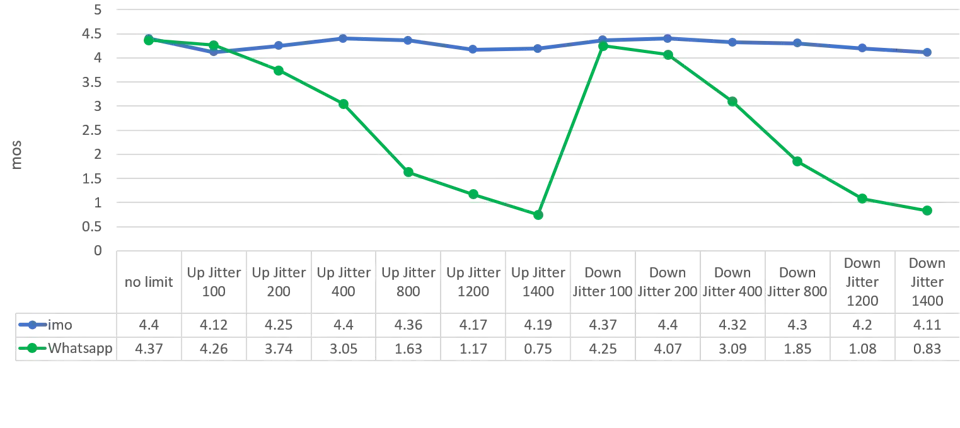
More data can be found in imo's audio and video call quality blog.
When Call Quality Problems Continue
Sometimes, call quality issues persist even after trying different apps and settings. In these cases, the problem may lie outside the app itself.
Checking network coverage in your area can provide useful context. Some regions simply have limited infrastructure, especially indoors or in remote locations.
Keeping the device and apps updated helps avoid bugs that affect call performance. Updates often include improvements to audio handling and network compatibility.
In some cases, changing data plans or using a different network provider improves call stability. This is not always possible, but it can help in areas with uneven coverage.
It is also worth recognizing when a problem is beyond software control. Severe congestion, physical signal barriers, or damaged hardware will affect any calling app.
Final Thoughts
Poor call quality is a common issue with many possible causes. Weak connections, limited bandwidth, high latency, and device problems all play a role. Voice calls are especially sensitive to these issues because they rely on steady, real-time data.
Apps like imo are designed with these challenges in mind. With imo HD video calling, the app adapts to changing network conditions to keep HD video calls smooth and usable, even on unstable internet connections.