Sharing your live location lets the person you’re meeting see where you are as you move. On imo, you can send it in a private or group chat and choose how long sharing lasts. Your friends can see your updated position without switching away from the conversation.
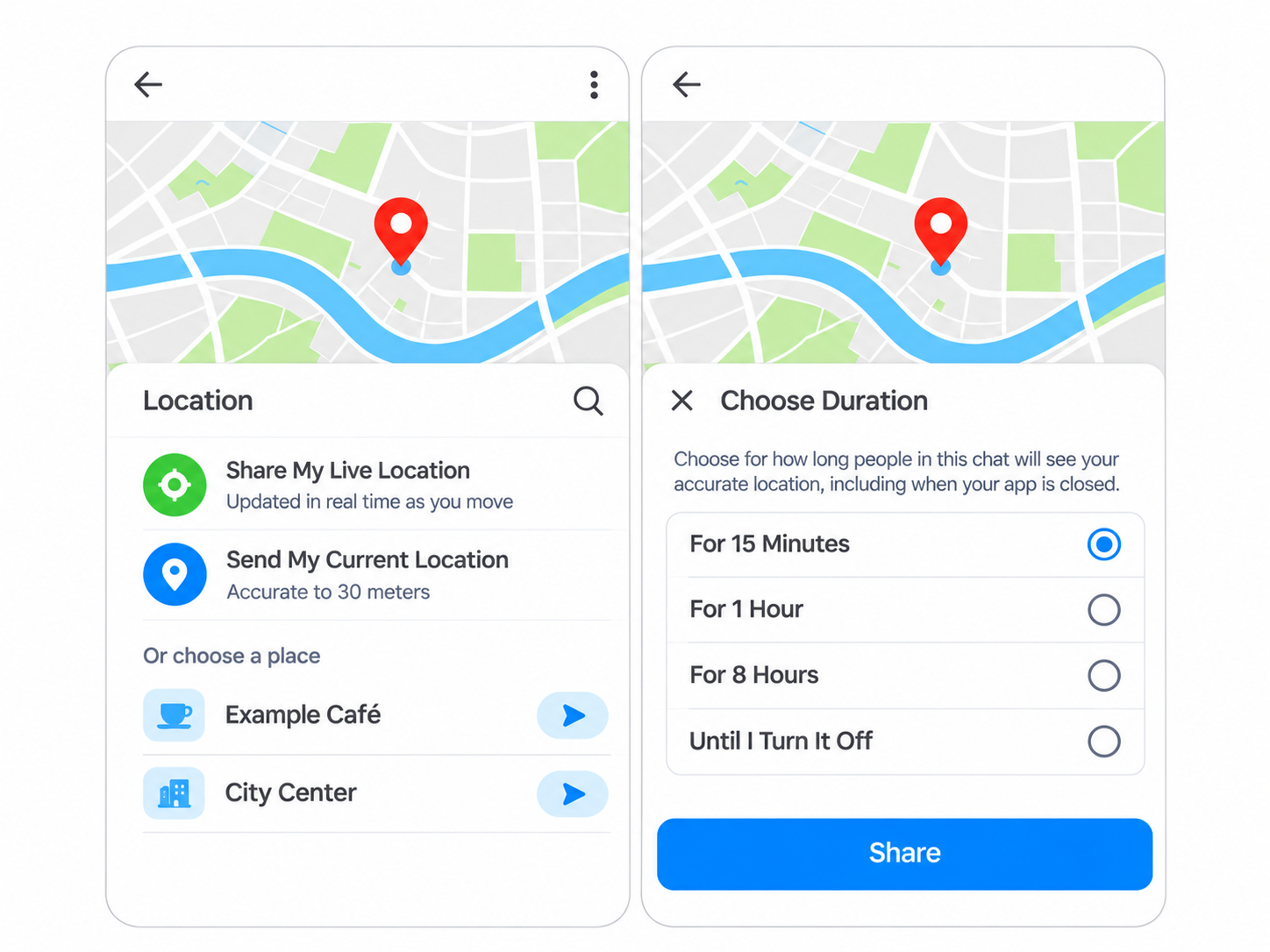
Live Location vs. Current Location
Share My Live Location updates your position as you move during an active share.
Send My Current Location sends a fixed map pin showing where you are at that moment. If you leave that spot, the pin still points to the same place.
|
What you need to share |
Which option to choose |
|
Your position while you’re on the way |
Live location |
|
The spot where you’re waiting |
Current location |
|
A place where you plan to meet |
Search for the place and send its location |
How to Share Your Live Location on imo
- Open the chat with the person or group you want to share your location with.
- Tap the “+” icon beside the message box.
- Select Location, shown as a green map pin.
- Tap Share My Live Location. If prompted, allow imo to access your location.
- Choose a sharing duration: 15 minutes, 1 hour, 8 hours, or Until I Turn It Off.
- Check the chat and sharing duration, then tap Share.
Sharing can continue when you close imo, so closing the app does not end an active share.
Share a Meeting Point on the Map
If you’ve agreed to meet somewhere, you can send that place’s location before either of you arrives. On imo’s Location screen, tap the search icon, search for the place, and check its name and address before sending it.
A map pin may show the right building without telling your friend which entrance to use. Add a detail the map may not show, such as “I’m outside Exit B, beside the café.”
The accuracy reading shows the estimated precision of your location at that moment. Even a precise pin may not tell someone which floor you’re on or which shop you’re standing outside. If you change your meeting spot, send a new location and say which one your friend should use.
Control Who Sees Your Location and for How Long
A live location share can keep updating after you leave the meeting point if it is still active.
If you’re meeting one person, you can send your location in your chat with them rather than the whole group.
The timed options let you limit sharing to 15 minutes, 1 hour, or 8 hours; Until I Turn It Off leaves the end time up to you. If you selected Until I Turn It Off, stop the share manually when you no longer need it.
Stopping the share won’t take back a location someone has already seen or saved.
When Your Live Location Isn’t Updating
A marker that stays still doesn’t always mean the person has stopped moving. Your phone needs to detect its location and have a connection to send updates.
Check that the live share is still active and hasn’t reached the end of its selected duration.
On the phone sharing its location, check the internet connection and whether imo has permission to access location. If updates stop when the screen locks, check whether the phone is restricting imo’s location access or background activity. Setting names vary by phone, so look under imo’s app permissions and battery settings.
While you check, send a message such as “The location hasn’t updated; I’m now outside the station.”
FAQs About Location Sharing
Why can’t I share my location?
Check that location services are turned on and that imo has permission to access your location. You’ll also need a working internet connection to send it. If you previously denied permission, open your phone’s settings, find imo, and check its location permissions.
Why is my shared location inaccurate?
Your phone may have trouble finding an accurate position indoors, underground, or near tall buildings. In your phone’s settings, check whether precise location access is enabled for the app, if that option is available. Moving to an open area may also help your phone get a better location fix.
Can I share my location with a group?
Yes. Open the group chat, tap +, and select Location. Choose Share My Live Location or Send My Current Location. Check that you’re comfortable sharing your location with the people in that group before sending.
Does live location sharing continue when I close imo?
Yes. Live location sharing can continue after you close the app, provided your phone stays connected to the internet and allows location access in the background. Sharing ends when the selected duration expires or you stop it manually.