حول ميزة رسائل الاختفاء في تطبيق imo
The disappearing messages feature in imo allows messages in a chat to automatically disappear after a selected period of time. It gives users more control over how long messages remain in a conversation and can be useful for chats where additional privacy is preferred.
You can set the message retention period to 1 day, 7 days, or 30 days. The setting applies to new messages sent after disappearing messages are enabled. Messages that were already in the chat before the feature was turned on will remain unless they are deleted separately.
How to Use Disappearing Messages
1. Open the chat where you want to use this feature.
2. Open the chat settings.
3. Select and enable Private Chat.
4. Choose the disappearing message duration: 1 day, 7 days, or 30 days.
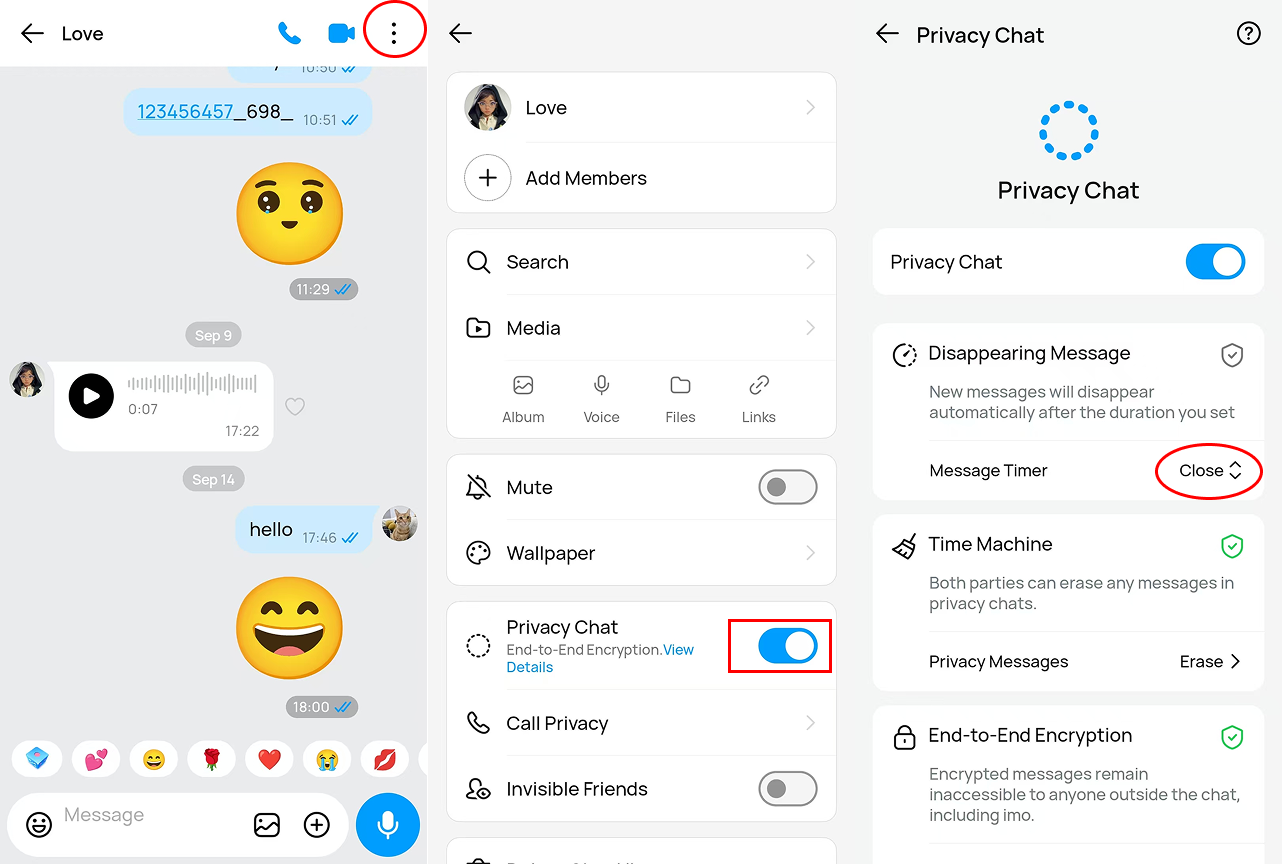
When Private Chat is enabled, disappearing messages are automatically turned on for that conversation. You can also manually turn off disappearing messages at any time if you prefer to keep messages in the chat.
After disappearing messages are turned off, new messages will no longer disappear automatically. Messages that were already covered by the previous retention setting may still disappear according to that setting.