የውይይት ታሪክን እንዴት ወደነበረበት መመለስ እንደሚቻል
Kindly share us more details as below for check:
1. The date of your lost chat history
2. The username of your contact for the lost chat
3. Did you delete your chat by mistake?
4. Did you change your device?
5. Did you or the other side enable disappearing message?
If one side turned on the disappearing message, chat record will be auto removed after the scheduled time.
You could find a notice in your chat box.
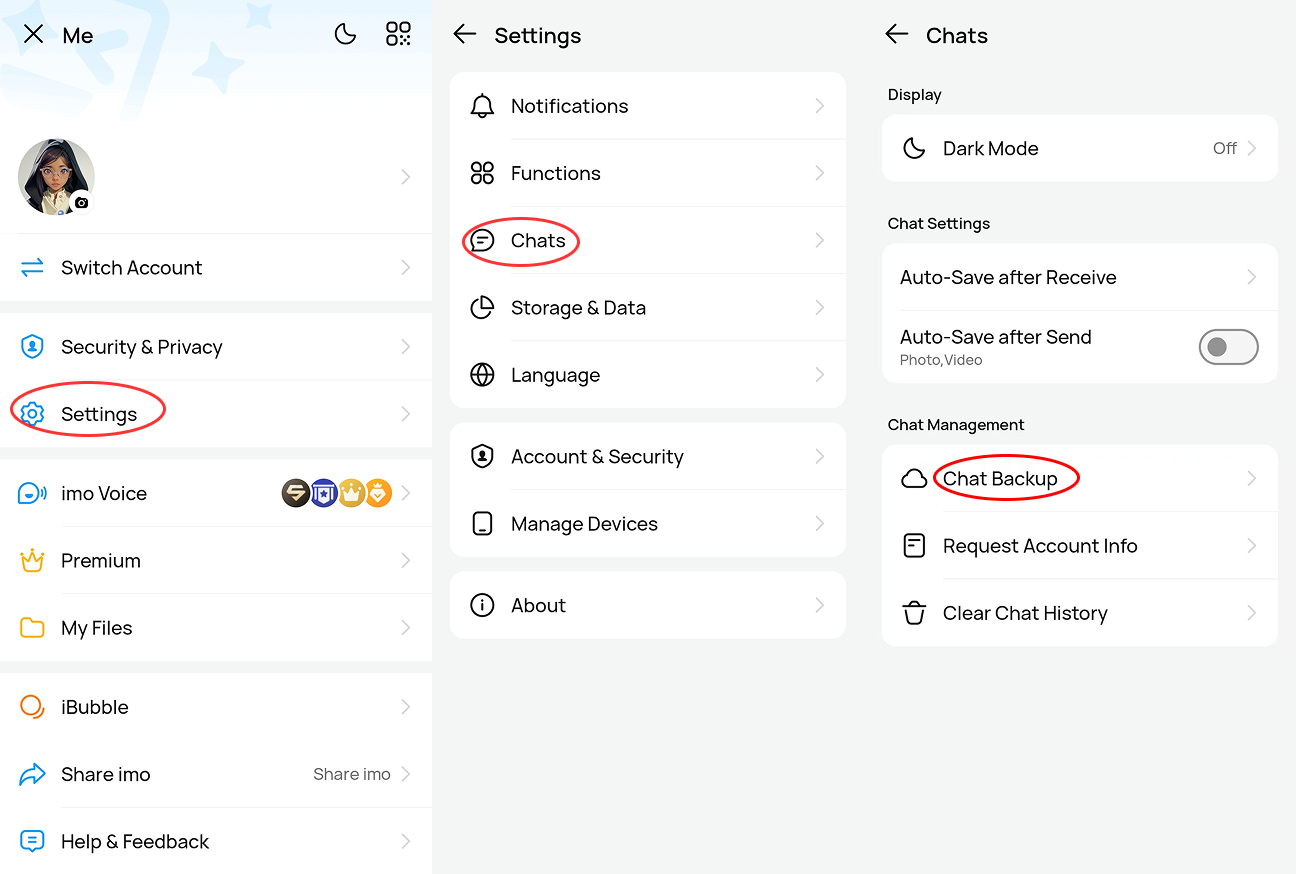
Before you change device or delete your chat, we suggest you back up your chat and media as follows:
Enter [Me] page
- [Setting];
- [Chats]
- Turn on [Chat Backup].
Note:
1) Update version directly won't lose chats, but uninstall imo and install will remove chats.
2) Unsaved photos and videos will be expired after 3 months.
3) Before you submit a feedback, please turn on [Upload log] for troubleshooting, except on imo Lite.
4) Ensure your device support Google service. Activate your Google account.
5) Ensure your device and Google account have sufficient space. Fore more details, click on the "?" in the corner of [Chat Backup] page.